


TicorAgent ONE
4.423.00 Reviews
App Specs
- Version
- 4.8.5.1.5
- Updated On
- License
- Free
- Downloads
- 10,000+
- Developer
- PalmAgent
- Categories
- Finance
- Platform
- Android
Screenshots
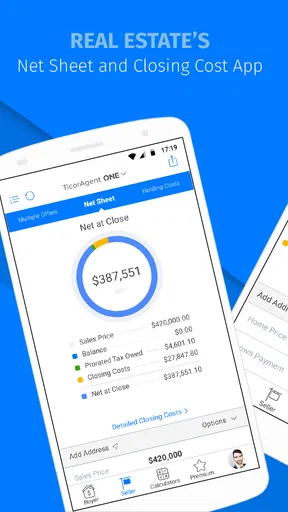
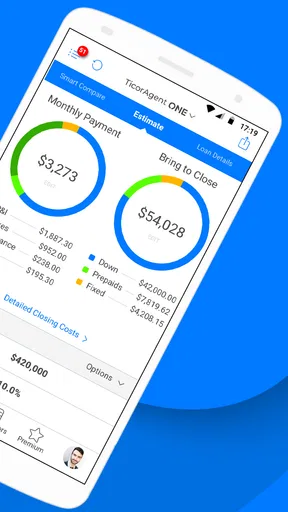
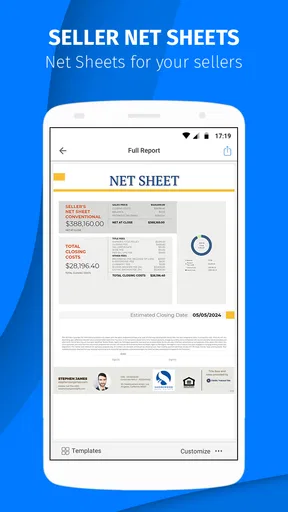


 Analysis by AppCompare
I approached TicorAgent ONE as a working tool rather than something to browse casually. It is a finance app made for real estate professionals, developed by PalmAgent, and that focus is clear from the first use: its value depends less on entertainment or visual polish and more on whether it helps an agent handle property-related work without adding unnecessary friction. For someone who spends the day moving between calls, appointments, listings, and client conversations, that distinction matters.
My overall impression is that this is a specialized companion for people already working in the TicorAgent environment. It is free to download, carries an Everyone age rating, and has built a modest but meaningful audience, with over ten thousand installs. The average rating sits at 4.4 from around fifty-eight ratings, which suggests that many users find it useful, although the relatively small audience means I would treat that score as a helpful signal rather than a complete verdict.
How the app feels to use in real estate work
The strongest reason to consider this app is its narrow purpose. General finance apps are usually built around personal budgets, banking, payments, or investment tracking. A real estate professional needs a different kind of support: something that fits into a workday where information is discussed quickly, checked between appointments, and revisited while speaking with buyers, sellers, or colleagues. TicorAgent ONE is aimed at that professional setting instead of trying to serve everyone.
That specialization can make the experience easier to understand for the intended audience. I do not have to interpret a personal-finance dashboard and wonder how it relates to a property transaction. The app’s identity is tied to real estate work, so the useful question is whether it fits the way an agent already operates. If you are not involved in that field, the app is unlikely to offer much value simply because its purpose is so specific.
The application was released on October 10, 2014, and its current version is 4.8.5.1.5. That long presence is reassuring for professionals who prefer tools with some history behind them, but it also changes how I judge it. I am not expecting a brand-new interface designed around the latest mobile conventions. I am looking for dependable navigation, readable information, and a workflow that does not slow me down when I am already under pressure.
Readability and navigation during a busy day
For me, readability is not just about whether text is technically visible. A useful work app should let me identify the next action quickly, especially when I am checking something while standing outside a property or preparing for a meeting. In that context, a clear sequence is more valuable than a crowded screen full of options. TicorAgent ONE makes the most sense when I treat it as a focused work utility rather than a place to explore.
I recommend spending a little time learning where the important areas are before relying on it during an appointment. That small preparation step is particularly useful for users who find unfamiliar navigation tiring or who need extra time to process several choices at once. A predictable personal routine—open the app, go to the work area I use most, complete the check, and close it—reduces the mental load considerably.
Worth Reading Before You Choose

EA SPORTS FC Mobile 26 Is a Bigger Football Game, but It Takes Time

Flipboard Shows What News Apps Must Do Beyond the Feed

Switching to Android Auto Means Rethinking Your Driving Routine

Google Calendar Makes a Crowded Week Easier to Manage

Ludo King Makes the Most of the Minutes Between Plans

Baby Panda World Brings Quick Play to Modern Phones, but Its Game Library Feels Busy
There is also a practical readability issue that affects many professional apps: information may be understandable when viewed calmly but harder to scan when the user is distracted. Real estate work often involves interruptions, background conversation, and quick changes of plan. I found that the app is best used when I pause for a moment rather than trying to operate it while walking, talking, or carrying equipment. That is not a flaw unique to this product, but it is an important part of deciding whether it suits your working style.
Users who rely on larger text, strong contrast, screen magnification, or other device-level adjustments should test the app on their own phone before making it central to their workflow. Mobile operating systems can improve access across many applications, but the result depends on how each app presents its content. I would not assume that a setting that works perfectly in a banking app will feel equally comfortable here.
Touch, vision, hearing, and cognitive comfort
From a motor perspective, the most important question is whether the app can be used deliberately rather than requiring fast, precise interaction. Real estate professionals may be using it one-handed, in a vehicle before driving, outdoors, or while holding documents. My advice is to avoid treating it as a tool for rushed tapping. Complete the important steps while stationary, with the phone supported, and allow yourself time to confirm what you selected.
That approach also helps people with tremors, limited dexterity, or fatigue. If a workflow requires repeated small taps, the physical effort can become more noticeable over a full working day. I would test the app at the end of a busy day, not only when feeling fresh. A tool that seems comfortable for five minutes may feel very different after several appointments and phone calls.
For users with visual sensitivities, the surrounding environment matters. A bright outdoor setting, a dim room, glare on the screen, or a moving vehicle can make any mobile interface harder to interpret. I found it more sensible to check details in a stable location and use device brightness and display settings that feel comfortable. The app’s professional usefulness should not encourage anyone to read or operate it while driving.
Hearing-related needs deserve a different kind of consideration. A person who cannot rely on audio cues should be comfortable with the app’s visual flow and should not build a workflow that depends on noticing sounds while multitasking. In a quiet office this may be easy; at a busy open house or in a noisy street environment, visual confirmation becomes more important. I would keep the phone available for direct checking instead of assuming that an alert alone is enough.
Cognitive accessibility is often overlooked in finance and property tools. The consequences of a misunderstanding can be more serious than simply opening the wrong screen. I recommend using the app with a written checklist for recurring tasks, especially when several properties or clients are involved. Recording the property or client context before beginning a task can also reduce the chance of switching between items and losing track of what has already been reviewed.
Using it across offices, appointments, and changing conditions
The app makes the most sense for an agent whose work moves between a desk and the field. At a desk, I can take time to review information and correct an entry. Between appointments, the benefit is speed: I can use a phone-based tool rather than waiting until I return to a computer. That flexibility is valuable, but it should not be confused with replacing every desktop workflow. A larger screen remains better for comparing several pieces of information, writing extensively, or reviewing a complicated transaction.
A realistic example is an agent preparing for a seller meeting in the morning, visiting a property around midday, and speaking with a buyer in the afternoon. The phone is the one device that travels through all three situations. TicorAgent ONE can be useful as part of that mobile routine, particularly when the agent needs a focused real estate tool rather than a broad collection of unrelated features. The best workflow is to prepare more detailed work in a calmer setting, then use the app for the parts that genuinely benefit from mobility.
Situational access also includes stress. A user may be dealing with a late appointment, a poor connection, a crowded office, or a client waiting for an answer. I would not make the app the only place where essential information exists. Keeping an appropriate backup process—such as a secure office record or a prepared note—can prevent a mobile interruption from becoming a professional problem. This is especially important for users who need additional time or who find unexpected interface changes difficult.
People who share devices or work across several phones should think carefully about their own routine before adopting it. A specialized app is most convenient when it is consistently available on the device used for work. If you regularly switch devices, forget passwords, or separate personal and professional phones, the extra setup and context switching may outweigh the benefit of having a mobile real estate tool.
Where the experience still creates barriers
The biggest limitation is not that the app serves a narrow audience; that is intentional. The limitation is that a narrow professional tool may not cover every part of a modern agent’s workflow. If you want a broad platform for communication, document collaboration, scheduling, accounting, and client relationship management in one place, this is unlikely to be enough by itself. I would see it as one component rather than a complete office system.
There is also a learning barrier for people who are new to real estate technology. A specialist app can feel obvious to an experienced agent but less clear to someone entering the industry. New users may need guidance from a colleague or time to build a repeatable process. That is not a reason to dismiss it, but it does mean the app is better suited to a professional who understands the surrounding work than to someone hoping the application will teach the entire business.
Cost is another point worth checking before committing to regular use. The app itself is free, but it includes in-app purchases ranging from $0.99 to $9.99 per item. I would review those purchase prompts carefully and decide which functions are genuinely necessary for my work. A free download can still become an ongoing expense if optional items are repeatedly needed, so a small trial period is sensible before recommending it across a team.
The operating-system requirement is also relevant. The app supports Android 7.0 and later, which covers many devices but may exclude older phones that a user keeps as a backup. Anyone relying on an aging work handset should check compatibility before planning around it. On the other hand, users with a supported device can evaluate the experience directly without having to purchase the app first.
Another barrier is the difference between accessibility in theory and accessibility in a specific situation. A person may be able to operate the app at home but struggle outdoors, with glare, gloves, limited connectivity, or a client standing nearby. I would test the exact conditions in which I expect to use it. That includes text size, hand position, screen brightness, and how easy it is to stop and resume a task without losing context.
Who should use it, and who should choose something else
I would recommend TicorAgent ONE to real estate professionals who want a dedicated mobile tool connected to their working routine and who are comfortable supplementing it with other office software. It is particularly appealing to agents who spend significant time away from a desk and want a focused way to handle property-related work from a phone.
I would be more cautious if I were choosing an app for a large team with very different accessibility needs. In that situation, I would test it with people who use larger text, screen readers, magnification, alternative input methods, or slower interaction speeds. A tool that works well for one fast-moving agent may not be equally comfortable for every colleague. The right decision should come from observing real workflows, not just reading the average rating.
I would also skip it if I were looking for a general personal-finance app. Budgeting, banking, expense tracking, and investment applications are designed around different priorities. Installing a real estate professional tool for household money management would create confusion rather than solve a problem. Likewise, an agent who needs a full desktop-style transaction suite may be better served by a broader platform and use a mobile companion only when it genuinely adds convenience.
Compared with a general finance application, this one has the advantage of professional focus. Compared with a broad real estate platform, its appeal is likely to be simplicity and mobility rather than a promise to replace every system an agency uses. That trade-off is important: focused tools can be easier to fit into a specific task, while broader alternatives may offer more connected features but require more setup and training.
My inclusive verdict after weighing the trade-offs
PalmAgent’s app is a sensible option for the right audience, but the audience matters more here than it would with a mainstream finance product. I like the idea of having a purpose-built mobile tool available during the parts of real estate work that happen away from a desk. I also appreciate that the free entry point makes it practical to test before deciding whether the purchase options are worthwhile.
My strongest advice is to judge it through your own conditions of use. Try it with your preferred text size, in the lighting where you normally work, and during a realistic task rather than a quick opening-and-closing test. Check whether you can pause without confusion, whether the controls feel manageable with one hand, and whether the information remains comfortable to read when you are tired. Those details will tell you more than a rating alone.
The app is not the obvious choice for everyone, and I would not present it as a universal replacement for desktop software, general finance tools, or a complete real estate management system. Its value comes from being specific. For an agent whose daily work matches that focus, it can become a useful mobile part of the routine. For someone outside real estate, or for a team that needs a fully unified and extensively customizable workplace, another option will probably be a better fit.
In the end, I see TicorAgent ONE as a practical specialist rather than an all-purpose solution. Its best qualities are its professional direction, mobile convenience, and approachable starting cost. Its main challenges are the need to test the interface against individual access needs, the possibility of extra in-app spending, and the fact that it works best alongside—not instead of—other tools. If your priority is a focused real estate workflow that you can evaluate on your own phone, it is worth trying carefully before making a larger commitment.
Pros
- Centralizes customer and property information in one mobile workspace.
- Helps agents manage tasks and follow-ups while away from the office.
- Provides quick access to listings and client details during appointments.
- Can reduce paperwork by supporting digital workflows and record keeping.
- Useful for teams that need a dedicated real-estate operations tool.
Cons
- Its usefulness depends heavily on your agency’s TicorAgent setup and permissions.
- New users may need training to understand the platform’s many features.
- Some functions may require a stable internet connection to work reliably.
- The interface can feel business-focused rather than simple or beginner-friendly.
- Advanced tools may be unavailable unless enabled by your organization’s plan.
FAQs for TicorAgent ONE
What is TicorAgent ONE used for?
TicorAgent ONE is designed to support real estate professionals with everyday transaction and agency tasks in one mobile environment. Depending on the services enabled for your account, it may provide access to transaction information, documents, contacts, communication tools, workflow updates, and other business resources. Its usefulness depends on whether your brokerage or organization has adopted the platform and configured the available features.
Who can use TicorAgent ONE, and do I need an account?
TicorAgent ONE is generally intended for authorized real estate agents and affiliated professionals rather than casual users. You will normally need valid login credentials connected to a participating brokerage, agency, or service provider before you can use the main functions. Downloading the app alone may not provide access, so confirm with your organization that your account has been created and activated.
Does TicorAgent ONE handle sensitive real estate information securely?
Because the app may be used for transactions, client details, property information, and business documents, users should treat it as a professional workspace and protect their login carefully. Security features and data handling can depend on the current app version and the organization’s configuration. Use a strong password, keep your device updated, avoid sharing credentials, and review the provider’s privacy policy before uploading sensitive material.
Can I use TicorAgent ONE on both Android and iPhone?
Availability depends on the official release and the requirements listed in the Google Play Store or Apple App Store. Before downloading, check that your device runs a supported version of Android or iOS and has enough storage for installation and updates. Some features may also require an internet connection, device permissions, or an account configured by your brokerage, so the experience can vary between devices.
Is TicorAgent ONE free to download and use?
The app may be available to download without an upfront charge, but that does not necessarily mean every service is free. Access can be included through a brokerage, agency, subscription, or other professional agreement, while certain features may require organizational activation. Check the official store listing and ask your administrator about licensing, possible fees, data usage, and whether your account includes all available tools.


